Node types
A workflow is a directed graph of typed nodes on the canvas. Execution starts at
START, follows the edges from node to node, and ends at an END node. Edges carry the
run's data forward; a CONDITION node uses its outgoing edges to branch. Alongside the data
that flows between nodes, the run keeps a shared state (a variable scope) that any node
can read and write.
This page is a tour of every node type — what it's for, when to reach for it, and the fields that matter. Each node is configured from a form in the editor; the field names below are the same ones you'll see there and on the wire. For the mechanics of running a graph, see Executing workflows and Debugging.
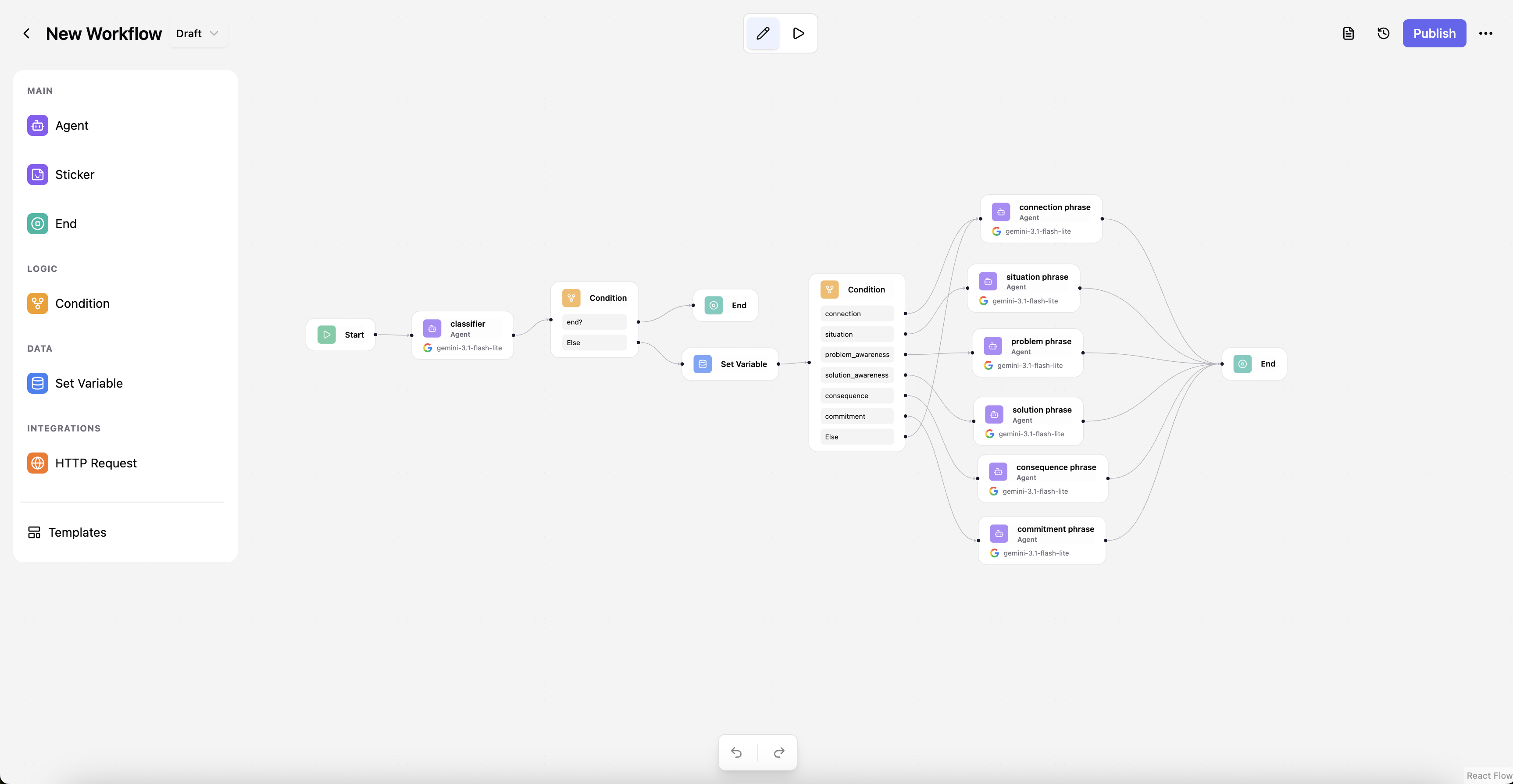
Node cheatsheet
| Node | Runs? | Use it to… |
|---|---|---|
START |
— | Begin the graph and take in the user's input (text or voice). |
AGENT |
✔ | Call an LLM — answer, reason, use tools, speak, or drive an avatar. |
CONDITION |
✔ | Branch the flow based on the data/state so far. |
SET_VARIABLE |
✔ | Read/compute values and write them into shared state. |
HTTP_REQUEST |
✔ | Call an external API mid-run. |
END |
✔ | Finish the graph and shape the reply that's returned. |
STICKER |
— | Leave a note on the canvas (never executed). |
DELAY |
✔ | Pause the run (reference SDK example node). |
START
The entry point of every workflow — there is exactly one, and execution always begins here.
It takes the caller's input and hands it to the first connected node. In a chat workflow
this is also where voice input is enabled.
firstPhrase— an optional greeting stored as the first assistant message when a chat session is created, so the conversation opens with your workflow speaking first.acceptVoice— when enabled, the run accepts an audio blob and transcribes it server-side (speech-to-text), so a spoken message drives the workflow just like typed text.voiceModel— the transcription provider/model to use (defaults to Whisper).
AGENT
The LLM node, and the richest one — this is where the actual "thinking" happens. It assembles the agent's instructions, chat history, and knowledge, calls the model, and can call tools in a loop (act, observe, continue) before producing its answer. It's also where a reply can be turned into voice or an avatar.
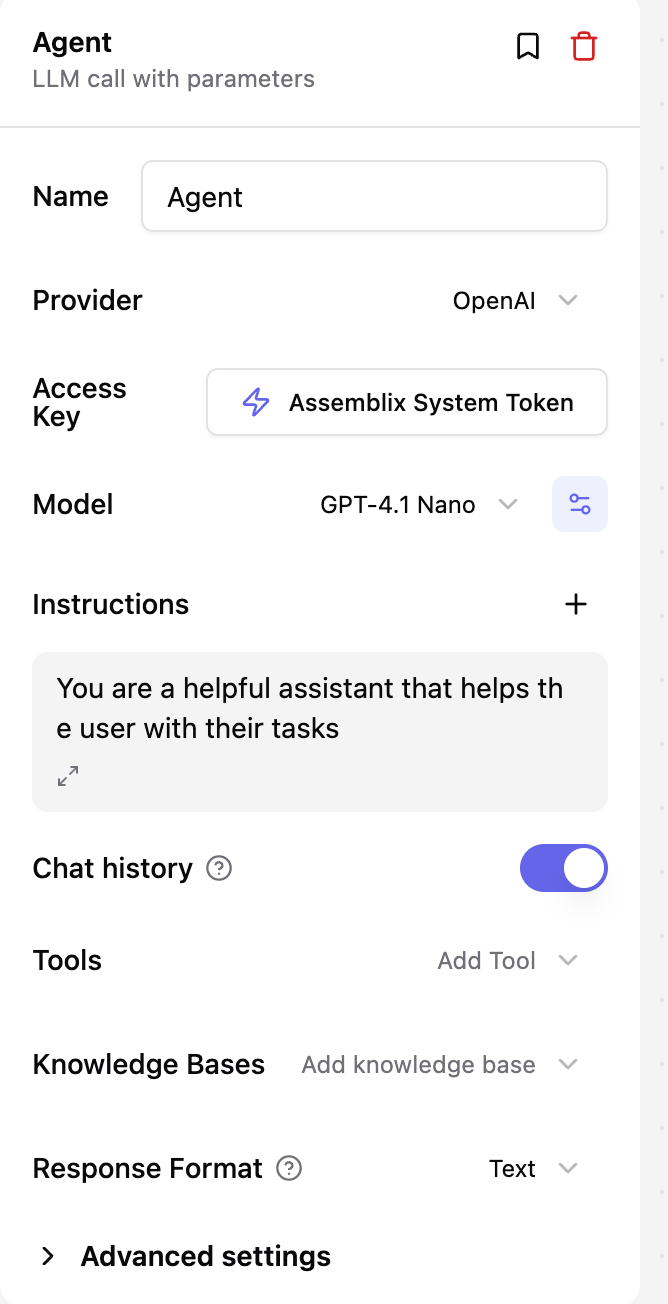
provider/model/credentialId— which LLM to call and with which stored credential (encrypted key).instructions— the system/context messages that steer the agent's behavior.params— sampling and generation knobs (temperature, max tokens, reasoning effort…).responseFormat—textfor free-form replies, orjson_objectwith an optionalresponseSchemato force structured output.tools/mcpServers— tools and Model Context Protocol servers the agent may call to take actions, not just answer.knowledgeBaseIds— knowledge bases (RAG) whose documents ground the agent's answers.outputType—text,voice(synthesized speech), oravatar(a talking persona), plus the associatedvoice/avatar config.fallbackModels/timeoutSeconds/maxRetries— reliability knobs for when a provider is slow or fails.
CONDITION
The branching node — it decides which path the run takes next. It evaluates an ordered list of
CEL expressions against the current data and state, and
routes to the first branch whose expression is true (falling through to else if none match).
Each branch is a separate outgoing edge on the canvas.
conditions— an ordered list of{ expression, name }. Evaluation is top-to-bottom; the first truthy expression wins, so order matters.
SET_VARIABLE
Writes into the run's shared state (or project-level state) — use it to remember values, compute derived data, or accumulate results across nodes.
updates— a list of{ variableName, value }, wherevaluecan be a static value or a CEL expression like{{ state.price * 1.2 }}evaluated at runtime.merges— "smart merges" that add / subtract / overwrite an object into an existing state variable, instead of replacing it wholesale.
HTTP_REQUEST
Calls an external HTTP endpoint mid-run — fetch data, post to another system, trigger a webhook. It ships with SSRF protection (internal/private addresses are blocked unless you opt in) and automatic retries on transient failures.
url/method/headers/body/queryParams— the request to send.timeout/maxRetries— how long to wait and how hard to retry.
END
The terminal node — reaching it stops the run. It selects what the final output should be
and filters which state variables are returned to the caller. A graph can have several END
nodes for different outcomes.
outputMode— where the reply comes from:last_agent(the most recent agent's output),specific_agent(a chosen node viasourceNodeId), orcustom(a renderedcustomMessage).stateFilter/projectFilter— restrict which state / project variables are included in the response.
STICKER
A visual annotation on the canvas — a note, label, or comment for whoever is editing the workflow. It is not executed and never enters the run; it's purely for documentation.
DELAY
A reference example node shipped with the node SDK. It pauses the run for a bounded number of seconds, then passes its input through unchanged — handy as a template when learning to author your own nodes.
seconds— how long to pause (0–300).
New node types can be added without a database migration. Authoring custom nodes is a
developer topic covered in the Node SDK contributor guide (internal-docs/CONTRIBUTING_NODES.md
in the repository).